
How to edit a page without affecting the live version?
Draft state lets you save edits to a page without making them live straight away. You can make changes to an existing page, or build a brand new one from scratch, and publish only when you're ready.
Why use it
- Make multiple rounds of edits without exposing half-finished changes to site visitors
- Get sign-off or a second pair of eyes before anything goes live
- Build a new page fully, in private, before it's publicly accessible
- Revert to an earlier version if something needs undoing, without losing your current draft work
How it works
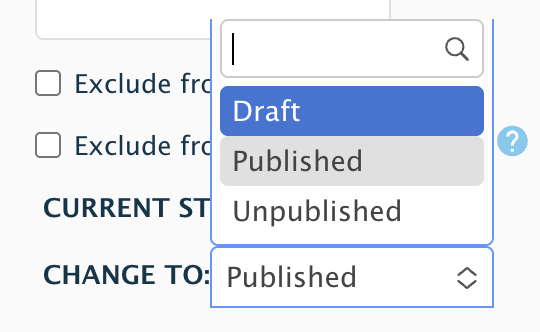
At the bottom of the page edit screen, choose Draft from the state dropdown:
- On an existing live page: your edits are saved as a draft. The page stays live showing its last published version, and your edits stay hidden until you publish them.
- On a new page: your edits are saved as a draft, and the page isn't published yet.
You'll also see Published and Unpublished as options here — Published makes your latest edits live, Unpublished takes a page down from public view.
Checking a page's state
On the Content landing page, each page shows a combined status, for example Published / Draft (live, but with pending edits not yet published). There's also a Moderated Content view where you can see every page's state at a glance.
Page edit buttons

- Latest version - shows your most recent edits, including anything saved as a draft
- View - shows what's currently live
- Revisions - shows the full history of versions, with the option to revert or set a different one as current