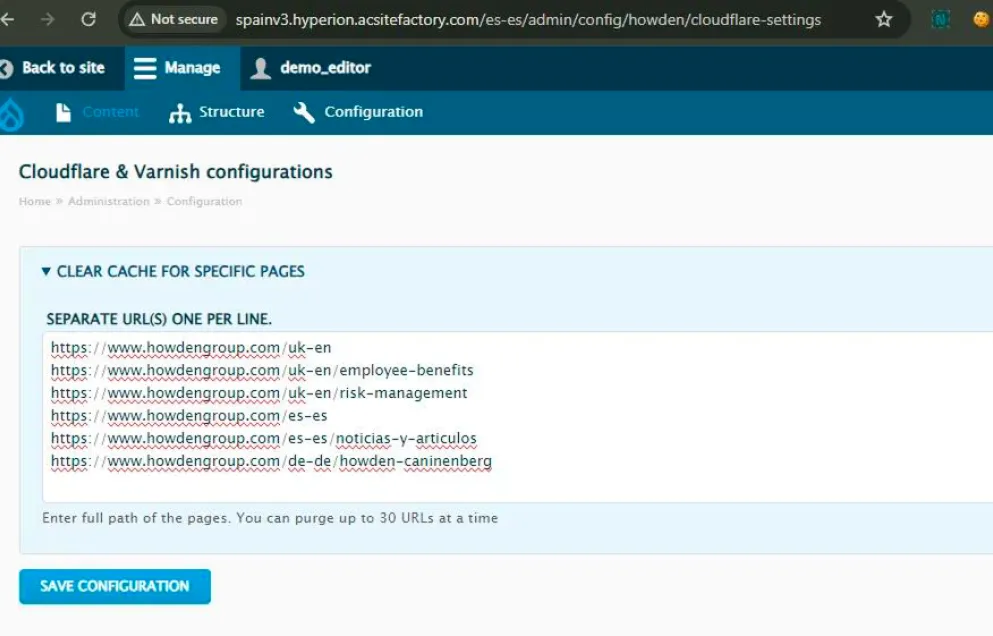
How to clear page cache?
 Prefer us on Google


You've published your latest page edits, but they are not reflecting on the live page?
We have now granted permissions to all CMS editors so you can clear your page cache yourself and see your updates instantly.
What is browser cache?
Browser cache is a temporary storage area in memory or on disk that holds the most recently downloaded Web pages. As you jump from Web page to Web page, caching those pages in memory lets you quickly go back to a page without having to download it from the Web again.
Well, that's one reason why you might not see your latest updates.
How to clear the individual page cache manually?
- Log in to your website's CMS
- After the country code, add this URL: /admin/config/howden/cloudflare-settings. Examples: Spain and UK
- Add in the LIVE link to the "Clear cache for specific pages'' box
- One per line making sure there is no space before or after the link. Maximum of 30 links at a time.
- Click 'Save Configuration'
- If you now refresh the links a couple of times, you should see your latest edits