
How to redirect?
The access to the redirects landing page is: /admin/config/search/redirect
Please add it after the country code. For example,
AUS: https://australia.howdenprod.com/au-en/admin/config/search/redirect
NZ: https://newzealand.howdenprod.com/nz-en/admin/config/search/redirect
One thing to note is that you cannot implement a redirect on a live page and from a used URL so:
Let’s take an example this page -> https://www.howdengroup.com/au-en/adiadraft
First you need to go and change the link to i.e. https://www.howdengroup.com/au-en/adia-draft-redirected
Publish it as you can’t change a URL on a Draft/Unpublished page
The CMS will create an automatic redirect from https://www.howdengroup.com/au-en/adia-draft to https://www.howdengroup.com/au-en/adia-draft-redirectedGo back to the editing mode of the page, on the right-hand panel, under REDIRECTS, remove the above redirect.
You can also remove it from this page https://australia.howdenprod.com/au-en/admin/config/search/redirectNow you can create the redirect you want
Please implement the redirects in the below format:
For the FROM link, start directly with the page link(the path after the country code), without the country code and without forward slash /.
For the TO link, always use the full absolute live link for the destination page.
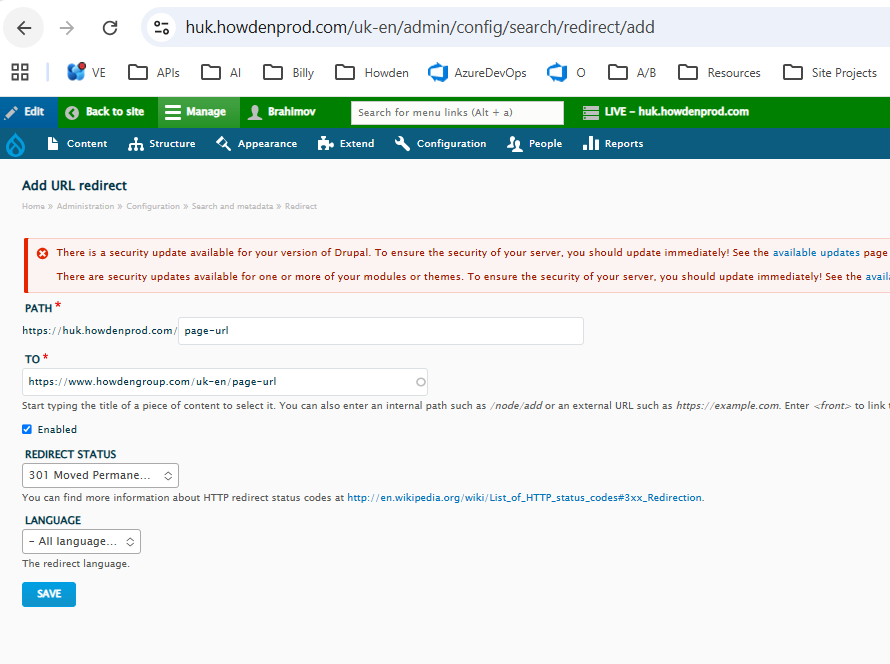
Note that redirects are immediately cached at the server level, and if you get it wrong and want to update it, you will need to raise it with the Platform team so the dev team can clear the cache, which can take some time. Please double-check before saving.