
SEO content planning & publishing
This guide provides an overview of SEO content planning and publishing. It will be regularly updated and expanded to support and guide your optimisation efforts.
Table of contents
Introduction
This guide provides essential best practices for publishing content that performs well in search engines, meets accessibility standards, and follows industry guidelines. Whether you're updating a product page, publishing a blog post, or making content changes across any Howden Group site, these principles will help ensure your work reaches the right audience.
Who is this guide for?
Anyone across the group and its subsidiaries who creates, edits, or publishes contents, both on platform (Drupal) but also applicable to off-platform.
1. Getting the foundations right
Good SEO starts with a clear strategy. This means having a strategic purpose and precise targeting to attract the right audience.
Step 1: Define your purpose and audience
Before creating content, think carefully about the aim (brand awareness, lead generation etc) and your target audience (who are you trying to reach, and what problems do they have?)
Step 2: Research what already exists
Firstly, confirm your content angle isn't already covered on your OWN website. If it's not, progress to conducting some research with Google.
Search for the content topic or keyword you want to cover and analyse what is in the results. This shows you what Google thinks users want to see, what format works, and where there might be gaps.
For example, searching "how does income protection insurance work" might return educational blog posts rather than product pages, telling you users want helpful information, not a sales pitch. A search like "best life insurance UK" may surface comparison guides, suggesting users want to weigh up options.
The benefit of starting broader with a topic, helps you unveil multiple content opportunities to formulate instead of zoning in on a specific keyword/query.
Step 3: Identify keywords and search queries
If you know the exact keyword you want to create content against, you should research what close and related terms should be covered alongside. This helps to ensure you create a page that users, search engines and large language models fully understand.
For example if you have a page about cookies, for users and to understand what type of cookies your talking about, you might include keywords or phrases like 'recipe' 'chocolate' 'chocolate-chip cookie' etc. This immediately helps establish the content is NOT about technical website cookies. You can use tools such as Semrush or even AI tools like Gemini to get natural language ideas on related terms.
If you're starting broader with a topic, for example 'cyber security', this will help you to build a broader content strategy and plan. Ideally, rather than thinking of single-ad-hoc content generation, you should be thinking of comprehensive content coverage with interconnected pages. This is what we call building 'topical authority'
Through starting research with a topic, you can unveil sub-topics with keywords that are bucketed into groups. This allows you to create strategically themed parent and child content pages - ultimately driving towards an ecosystem of content on a specific topic, demonstrating to both users, search engines and LLMS, that you're a key thought-leader in a specific topic.
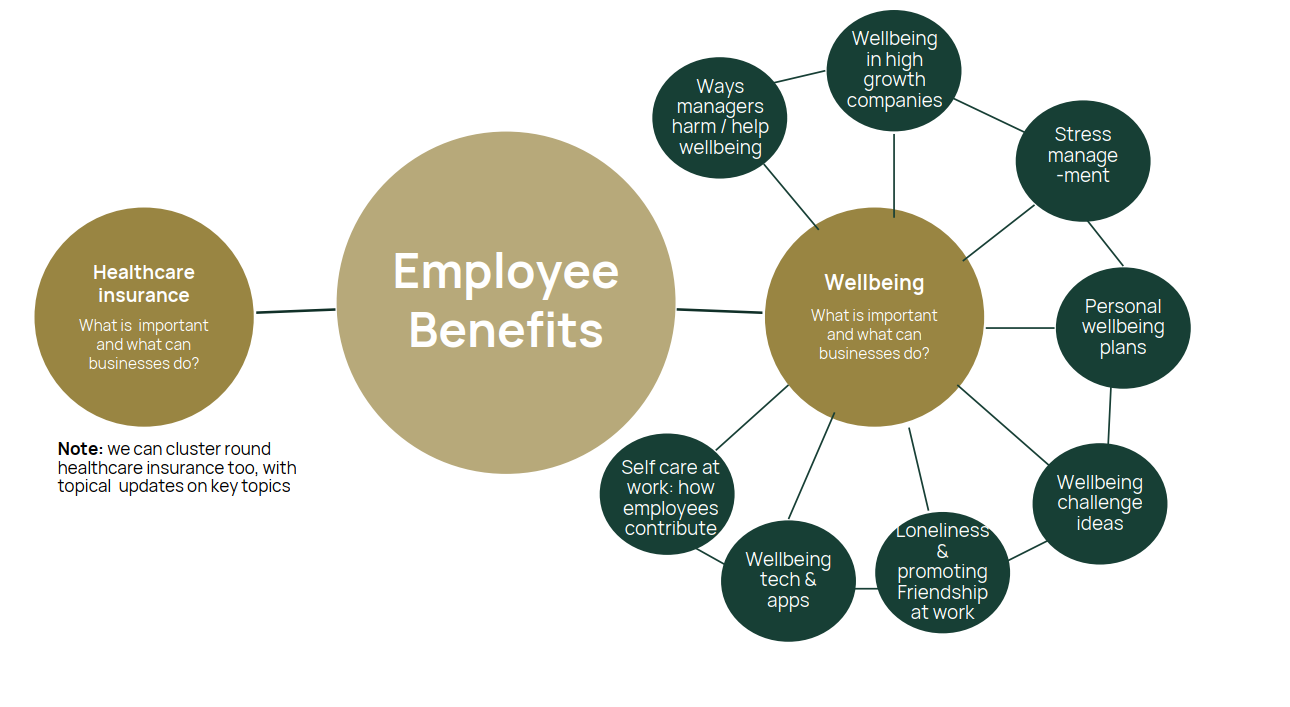
A visual example of building topical authority
- The broad topic is represented by the large gold circle, 'employee benefits' - this is the 'pillar' or 'money' page we want to drive traffic and visibility against
- The darker gold circles are sub-topic pages off employee benefits - in reality there would be many. Each sub-topic would go after keywords tightly associated to that sub-topic.
- The green circles are the specific supporting content angles that relate an individual sub-topic, in this example related to wellbeing. These typically are longer-tail keyword targetted pages.
- All the content is strategically grouped and interconnected.
This is modern-day SEO and how we drive topical authority. It requires careful and thorough planning - reach out to the Group Data & SEO team to help support with creating topical authority.
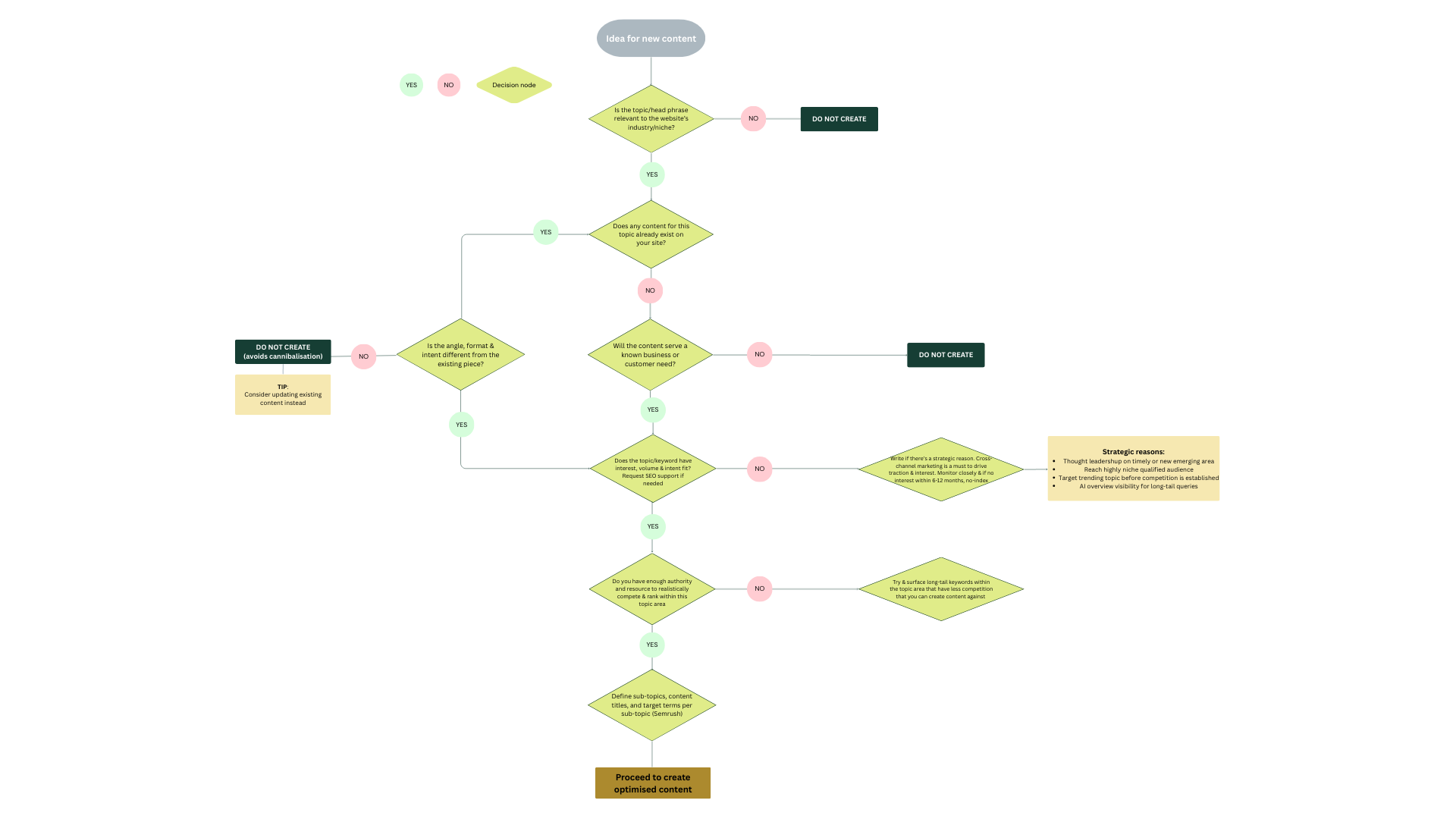
Planning new web content? A decision tree that'll help
Determine whether a new content idea should be created, updated from an existing page, or not pursued—so you avoid duplication, keyword cannibalisation, and low‑value work.
2. Content creation
Principles to work by when creating your content
1) Match search intent aka user-intent
When you search the content piece’s topic or target term, what do you see in Google?
- If it's competitor content that is largely formed of guides, how-to's, definitions and longer-form blogs and articles - then this infers users searching this term want INFORMATIONAL content (e.g., "how to buy professional indemnity insurance"). Don't go against the grain.
- If the content is largely to buy and compare, this constitutes commercial intent (e.g "cyber insurance for SMEs")
- Content that's quote and buy heavy? This is transactional intent: The user is ready to act (e.g., "Motor insurance quote")
2) Create content formats that matches what users actually want for that given term. If it's commercial intent, don't creating a 4,000 word page block content page. Commercial intent expects content that shows benefits, policy highlights, and conversion-ready actions.
3) Use natural language and structures: Write for humans first always, but also factor in machine preferences for easy extraction. Include relevant terms naturally within helpful, readable content - never force keywords and terms in awkwardly. Ensure short digestible sentences. Include questions with direct answers.
4) Ensure experience, expertise, authority and trust are demonstrated (EEAT) - this is a principle for creating helpful content that performs well for users search experiences - given we also operate in the financial services industry, we should also abide by 'Your Money, Your Life' (YMYL) which refers to creating superior trustworthy reliable content where it can impacts someones financial and money decisions.
How to demonstrate experience, expertise, authority and trust (EEAT)
Unique, original, human-written/contributed content that includes:
- Author names and bylines, especially relevant to blogs and articles.
- Quotes, stats, facts and figures (with sources cited).
- Proprietary data - pieces like the Sports Injury Index by Howden is an excellent example of our own research, in turn driving a lot of PR and backlinks, accelerating our SEO efforts.
- Ensuring claims are supported through-out your writing - don't make generic claims without supporting evidence or opinions.
Link doesn't work? Contact Aniqa or Emelye and we can invite you to the cloud document
3. Optimising for modern SEO - inclusive of AI
The connection between SEO, AI and UX
The way people search is evolving. In addition to traditional search engines which remain vital, users are increasingly turn to AI-powered tools like ChatGPT, Google's AI Overviews, and voice assistants to find information.
SEO principles underpin visibility in AI
In order to appear in AI responses your content needs to be crawled and indexed by search engines.
Did you know chatGPT uses bing search engine to access training and real-time data? Whilst Gemini draws from Google's search index. The fundamentals haven't changed, they've just become more critical than ever.
Quality content has always mattered, now it's non-negotiable
Long before AI arrived, expert, authorative and well structured content was the key to abiding to Google's 'grading' criteria and successfully sustaining rankings and quality traffic. AI amplifies this need in order to be citied and mentioned.
AI optimisation (GEO/AIO) is modern SEO
GEO/AIO doesn't work without SEO fundamentals, both depend on content that serves users effectively. With that said, GEO/AIO does favour certain structures, formats and layouts.
The explicit tactics that work well for AI extraction that also improve user-experience (UX).
- Clear, scannable structure
- Well-organised information that's easy to extract
- Consider lists and tables where appropriate
AI bridges the gap between SEO & UX
If your content's intent, structure, layout, quality and experience is bad, then search engines and LLMs are less likely to serve that content highly vs competitors .AI tools simulate user behaviour and predict their next question or query - if a human wouldn't find your content useful, chances are AI won't either where others do it better.
Best practices that work to enhance AI visibility, not work against it
Content and structure:
- Short sentences lengths - this is good for humans readability and machines alike to extract.
- Use bullet points, tables and numbered lists where required - these help Google AI overviews and LLMs extract and summarise information and also easily make content scannable for mobile too.
- Include natural question phrases in your content where appropriate (e.g., "What does cyber insurance cover?")
- Anticipate follow-up questions a user may ask - ensure they're captured in your content or if relevant to as a standalone content piece - be part of the conversation
- Provide direct, concise answers immediately after question-style headings within the first sentence, reiterating the key elements of the question. E.g What's is Cyber Insurance? 'Cyber insurance is coverage that protects you from.....'
- Include propriatry data, stats, facts, citations and back up claims and statements - this is for long-term sustainable success
- Ensure your brand is described consistently and correctly - control the narrative.
Headings:
- Keep headings under 70 characters - this is good practice all round
- Write headings as clear, specific statements or questions
- Humans, assistive tech, traditional search and AI systems use headings to understand content structure
General writing
- Don't add filler or unnecessary words in your sentences
- Avoid jargon where possible, or explain technical terms
- One idea per sentence helps humans and AI alike
- Make every sentence and paragraph count - they should be able to stand on their own. AI can grab a sentence or section from anywhere on the page, if it's vague and losing relevancy to the overarching page topic, you could risk being surfaced out-of-context in LLMs and AI overviews, if extracted at all.
Demonstrate expertise, authority and trust
- Include authors and author bylines - this is good modern SEO practice. These have dedicated placements in the hero banner and a people highlight feature that can be placed at the bottom of blogs and articles
- Include proprietary data, stats, facts, studies and quotes - reference sources using superscripts or hyperlinking
- Ensure the claims you are making in your writing are supported
- Jump up to the full EEAT section for more
- And finally, ensure you update historical content. AI takes a preference for fresh-ness. Only ever update published dates when a substantial amount of copy has been adapted (>40%).
- If an article or blog has been embellished or slightly tweaked, insert " [originally published [month] [year]. Updated [month] [year] " before the opening paragraph.
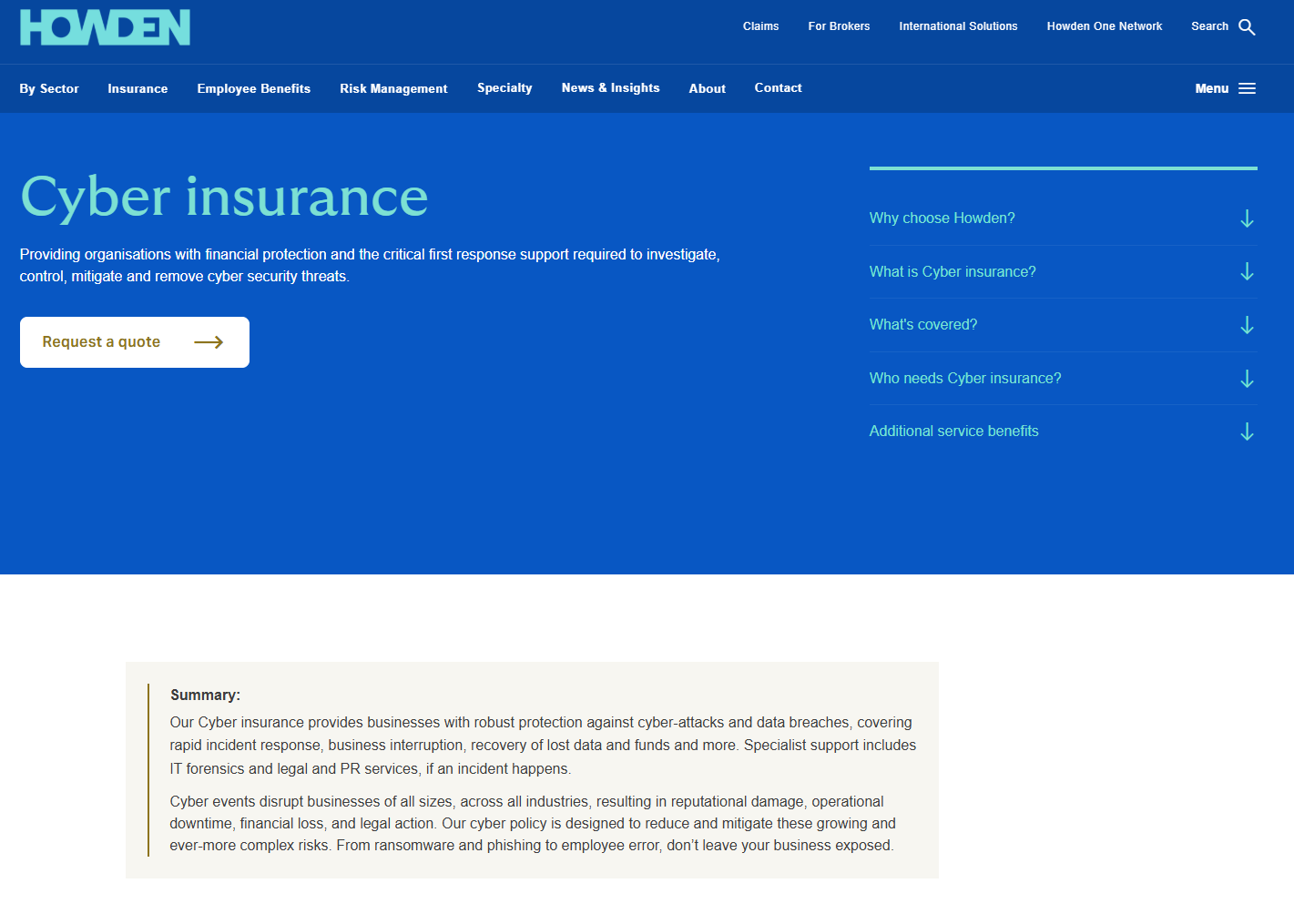
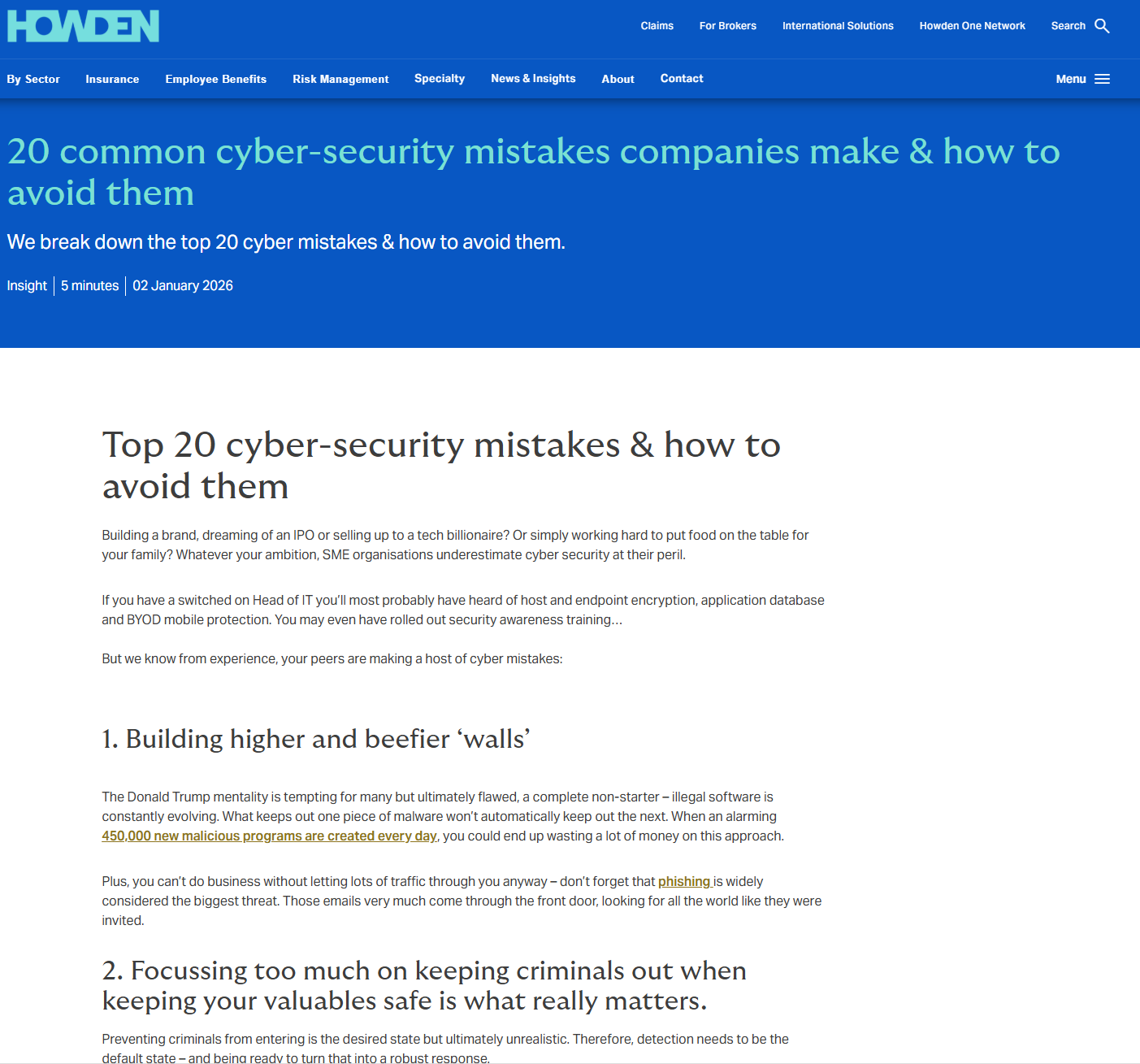
Some great examples to inspire you
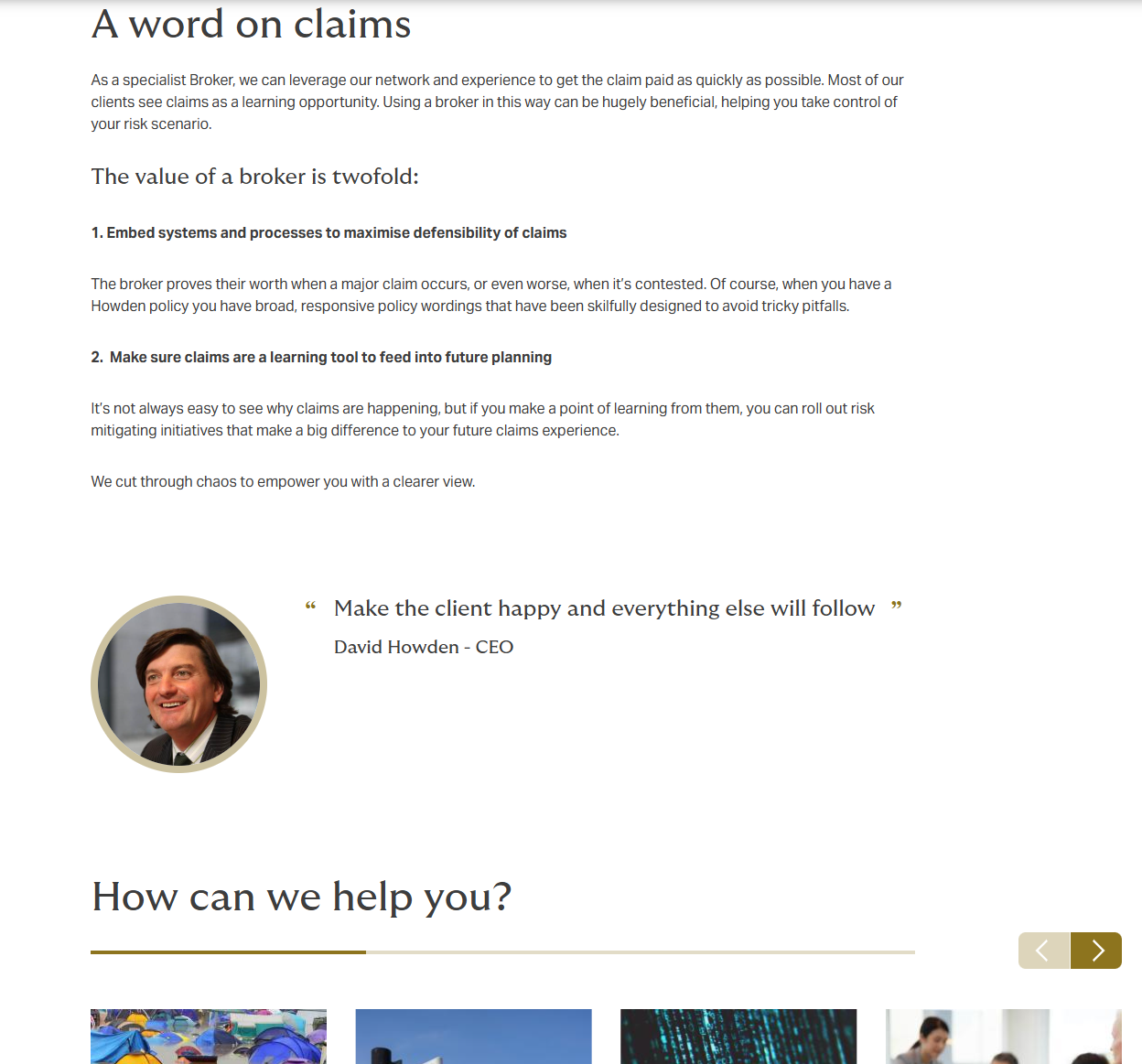
Need some inspiration on how to implement good SEO principles, benefiting AI too? Here are some exemplar pieces of content to guide you that not only out-perform in traditional search, but are often cited in AI.

Content build and publication
The next section focusses on the content and page build, and what factors to consider for effective optimisation as well as best practices
4.Titles
Page Title
This field serves multiple purposes, and understanding these distinctions is crucial:
- It allows for labelling your page in the content management system (how you find it in your content list)
- It's the title used when displaying the page in other components such as carousels, grid components, and content lists on the site.

Best practices
- Use clear, descriptive language that identifies the page's purpose - take into consideration the general format of page naming through-out the site to ensure standardisation and consistency.
- Keep page titles concise but meaningful for when they appear in components
- Ensure the page title aligns to the navigation/menu link (should if be present) - this is again to ensure consistency and good UX.
SEO title (Meta Title):
The title that appears in search engine results and browser tabs, editable under “page information” or “meta tags” within the far right blue side bar.

Best practices
- It should contain no more than 60 characters to avoid truncation in search engines.
- It should be in title case - this is the standard, common format in search engines for increase CTR and readability.
- It should include relevant target keywords/topics naturally and accurately represent what the page is about (e.g., "Cyber Insurance for Law Firms")
- If character count permits, appending the Brand + Country, seperate by a pipe, helps with localisation. (e.g., "Cyber Insurance for Law Firms | Howden UK")
Hero banner title (H1):
The main visible heading users see at the top of the page. It's the one and only H1 sized title that should be present on the page.

Best practices
- Aligns to main term/topic in the SEO title (e.g if the SEO title is 'Equine insurance', we don't expect to see 'Horse insurance' as the H1 or page title'.
- Keep titles concise but meaningful for when they appear in navigation components
- Think about how the title will display when this page is pulled into a carousel or grid elsewhere on the site
5. URLs
Why URL structure matters
URLs are more than just web addresses - they play a crucial role in:
- Helping search engines understand your site's hierarchy and structure
- Supporting big data analytics and reporting (e.g allows easier segmentation of site sections)
- Making links easier to share and remember
- Helping users understand where they are on the site
- It's common practice to have a proper structure that mirrors the information architecture
Your URL should reflect where the page sits within your website's hierarchy. Think of it like a filing system.
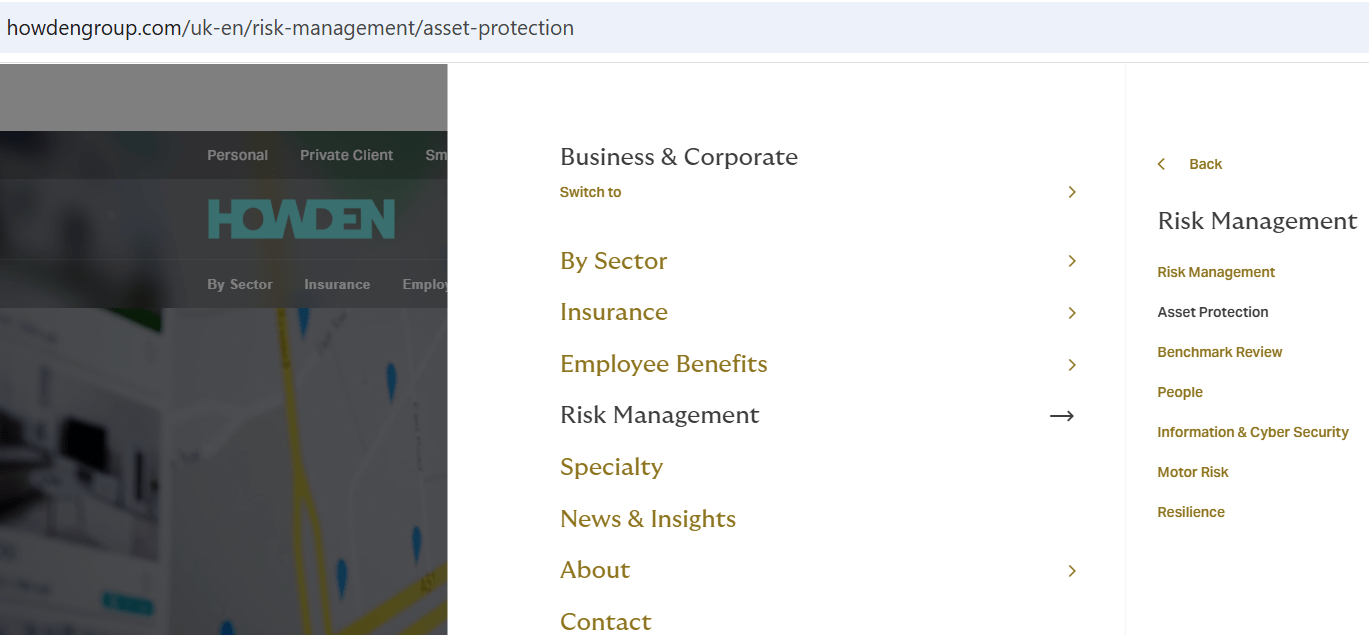
The anatomy of a URL can be seen below. Subfolders follow the website information architecture, don't make this up randomly. The last part, is the slug.

Example
URL paths typically reflect site structure (the nav and menu), showing each section after the country and language folder; for example, 'risk management' comes after the site path 'uk-en', then 'asset protection'.
/uk-en/risk-management/asset-protection
Best practice for URL slug naming conventions
Character rules:
- Use only lowercase letters
- Use hyphens (-) to separate words, never underscores or spaces
- Stick to the ASCII character set - no special characters (é, ü, £, etc.)
- No spaces, apostrophes, or ampersands
What to avoid:
- Auto-generated URLs with random numbers or symbols (e.g., /node/12345)
- Keyword stuffing (cramming multiple keywords unnaturally)
- Excessively long URLs
- Using the 'generate automatic URL alias' checkbox in drupal
And finally remember the structure rules:
- Follow your site's folder hierarchy (e.g., /uk-en/sector/health-and-care/medical-indemnity-insurance)
Examples:
| Good | Avoid |
|---|---|
| /uk-en/insurance/cyber-insurance | /cyber |
| /uk-en/sector/health-and-care | /healthandcare |
| /uk-en/insurance/professional-indemnity-insurance | /uk-en/professional-indemnity-insurance-cover-howden-uk |
| /uk-en/resources/types-of-commercial-insurance | /uk-en/types-of-commercial-insurance-for-businesses-in-the-uk-2025-howden-uk |
Warning: Changing URLs
Changing a URL can:
- Impacts the SEO value (link equity) that page has already accumulated
- Impacts wherever the link was previosuly placed i.e other websites, emails, documents etc. Drupal will enforce a 301 redirect when a page's URL is updated, ensuring anywhere the old link exists doesn't break, but it creates a 'double-hop'
If a URL change is genuinely required because it doesn't follow best practice then:
- Contact the SEO team for approval before making any changes - we want to limit mass URL updates. Ad-hoc are fine
- Note that the CMS will auto-redirect the old URL when you amend an existing.
- Ensure you update any internal links pointing to the old URL across marketing collatoral and websites to prevent routing users and search engines via a 301 redirect
6. Meta Descriptions
What is a meta description?
The meta description is the short summary that appears beneath your page title in search engine results. While it doesn't directly affect rankings, it significantly influences whether someone clicks through to your page.
Best practice for meta descriptions
- Summarise the page in one or two clear sentences
- Include relevant keywords naturally - these often appear bold in search results when they match the user's search
- Keep it between 150-160 characters - longer descriptions get cut off in search results
- Include a call to action at the end if space permits (e.g., "Get in touch today", "Speak to our experts", "Request a quote")
- Make it unique for every page - never duplicate meta descriptions
Writing effective meta descriptions
Think of the meta description as your page's advertisement in search results. Ask yourself: "What would make someone click on this?"
Examples:
| Good | Avoid |
|---|---|
| "Cyber insurance provides businesses with robust protection against cyber-attacks and data breaches. Speak to our specialists about your cover today." (147 characters) | "Cyber insurance page. Insurance information. Coverage details." (Too vague, no value proposition) |
| "Professional indemnity insurance protects your business against claims for loss or damage from clients. Our experts handle placement to claims in-house." (156 characters) | "PI insurance for professionals who need cover." (Too short, missing detail) |
Where to input meta description in Drupal?
Enter your meta description in the designated Description field, usually found in the page's “meta tags” section inside the far-right blue panel

7. Headings and Content Structure
Why heading structure matters
Proper heading structure is fundamental for three reasons:
SEO
Search engines & large language models use headings to understand the hierarchy and main topics of your pageAccessibility
Screen readers use headings to help visually impaired users navigate contentReadability
Headings help all users (and AI as a user) find information quickly
Understanding heading hierarchy
A basic application of heading hierarchy would look as follows:

Best practice for headings
The golden rules:
- One H1 per page only - this is your main heading and defines the page's primary topic. In Drupal, this is often automatically generated from placing a hero banner component.
- Never use headings for design purposes and never skip heading levels - don't jump from H1 to H3. Always follow the sequence: H1, then H2, then H3, then H4.
- Keep headings under 70 characters - this is important for both readability and AI/LLM optimisation.
- Make headings descriptive - avoid vague headings like "Introduction" or "More Information". Instead, clearly describe what the section covers.
- Include keywords where natural - but never force them in awkwardly.
Accessibility considerations:
Screen readers allow users to navigate by jumping between headings. If your heading structure is illogical or headings are skipped, visually impaired users will struggle to understand and navigate your content.
Example of correct structure:

In Drupal: When adding text content, use the formatting toolbar to select the appropriate heading level (Heading 2, Heading 3, etc.). Never use bold text to simulate a heading - always use proper heading tags.
8. Images
Why image optimisation matters
Images improve engagement and help users understand content visually. However, poorly optimised images can slow down your pages significantly, which negatively impacts both user experience and search rankings.
Image compression tools
Before uploading any image, compress it using one of these tools:
- Photoshop or Affinity Photo (for conversion and compression)
- TinyPNG (free online tool: tinypng.com)
- Squoosh (free online tool: squoosh.app)
- Preview (Mac) or Paint.NET (Windows) for basic editing
Alt text: What it is and why it matters
Alt text (alternative text) is a written description of an image that:
- Is read aloud by screen readers for visually impaired users
- Displays when an image fails to load
- Helps search engines understand and index your images
- Is a legal requirement under accessibility standards (WCAG)
Writing effective alt text
Best practices:
- Be specific and descriptive - describe what's actually in the image
- Keep it concise - aim for under 125 characters
- Focus on the image's purpose - what information does it convey?
- Include relevant keywords where natural, but never force them
- Use proper punctuation - this helps screen readers pause appropriately
What to avoid:
- Starting with "Image of..." or "Picture of..." - screen readers already announce it's an image
- Keyword stuffing
- Being too vague (e.g., "Chart" or "Photo")
- Leaving ALT text empty for meaningful images
Examples:
| Image | Poor ALT text | Good ALT text |
|---|---|---|
| Team meeting photo | "Meeting" | "Howden brokers discussing client risk assessment at whiteboard" |
| Cyber security infographic | Infographic | "Diagram showing four stages of cyber incident response including stage 1: indentify, stage 2..." |
| Office building exterior | "Building.jpg" | "Howden London office, One Creechurch Place" |
| Chart showing claims data | "Chart" | "Bar graph showing professional indemnity claims by sector, 2024" |
Decorative images: If an image is purely decorative (adds no information), leave the alt text empty in Drupal or mark it as decorative. This tells screen readers to skip it.
In Drupal: When uploading an image, you'll see an "Alt text" or "Alternative text" field. Always complete this field for meaningful images.
9. Internal and External Links
Why we need them
Internal links connect pages within your own website. They serve three important purposes:
1.
Help users navigate to related, relevant content2.
Help search engines discover and understand your site structure3.
Distribute link equity to important pages
Understanding link equity
Link equity (sometimes called "link juice") is the SEO value that passes from one page to another through links. Think of it like a recommendation - when a page links to another page, it's essentially saying "this content is valuable."
Understanding how link equity flows helps you make strategic decisions about where and how you link.
Anchor text best practices
Anchor text is the clickable text in a hyperlink. It's crucial for both user experience and SEO because it tells users and search engines what the linked page is about.
Best practices:
- Use descriptive, contextual text that accurately describes the destination page
- Vary your anchor text - don't use the same phrase every time you link to a page
- Be natural - the link should flow within your sentence
Examples:
| Good | Avoid |
|---|---|
| "Our cyber insurance provides businesses with protection against data breaches" | "Click here" |
| "Learn more about professional indemnity insurance for consultants" | "Learn more" |
| "Speak to our health and care insurance specialists" | "Find out more here" |
| "Compare our directors and officers liability cover" | "Read this" |
Variety matters: If you always link to a page using the exact same anchor text, it can look unnatural to search engines. Mix it up:
- "cyber insurance"
- "protection against cyber-attacks"
- "cyber liability cover"
- "our cyber insurance specialists"
External links
External links point to other websites. Use them to:
- Reference authoritative sources (e.g., FCA, ABI, ICO, SRA, government websites)
- Support claims with evidence
- Provide additional value to users
Best practices:
- Only link to trusted, reputable sources
- Ensure external links open in a new tab so users don't leave your site
- Don't overdo it - focus on genuinely useful references
10. Tags and Categories (Taxonomy)
What are tags and categories?
- In Drupal, taxonomy terms (tags and categories) help organise your content. They:
- Group related content together
- Power dynamic content features (like "Related articles" sections)
- Help users find content on similar topics
- Support search engine understanding of your content themes
These are set by site admins, can take several different forms. E.g."/news", "/insights", "/reports", "/insurance", "/sector" etc.
Best practice for taxonomy
- Use relevant tags that accurately reflect the page's main topics
- Reuse existing tags rather than creating new variations (e.g., use "Cyber Insurance" consistently, not "Cyber Cover", "Cyber Liability", etc.)
- Don't over-tag - focus on the 3-5 most relevant terms
- Check existing tags first before creating new ones to maintain consistency
When to involve the SEO team
For strategic, high-value content, the Group Digital Optimisation & SEO team can support with:
Comprehensive keyword and topic research, competitor content analysis, content gap identification, search intent analysis, and forward content planning.
Contact the SEO team early when planning:
New product or service pages, major content campaigns, website sections or restructures, and high-priority landing pages.
11. Final checklist before publishing
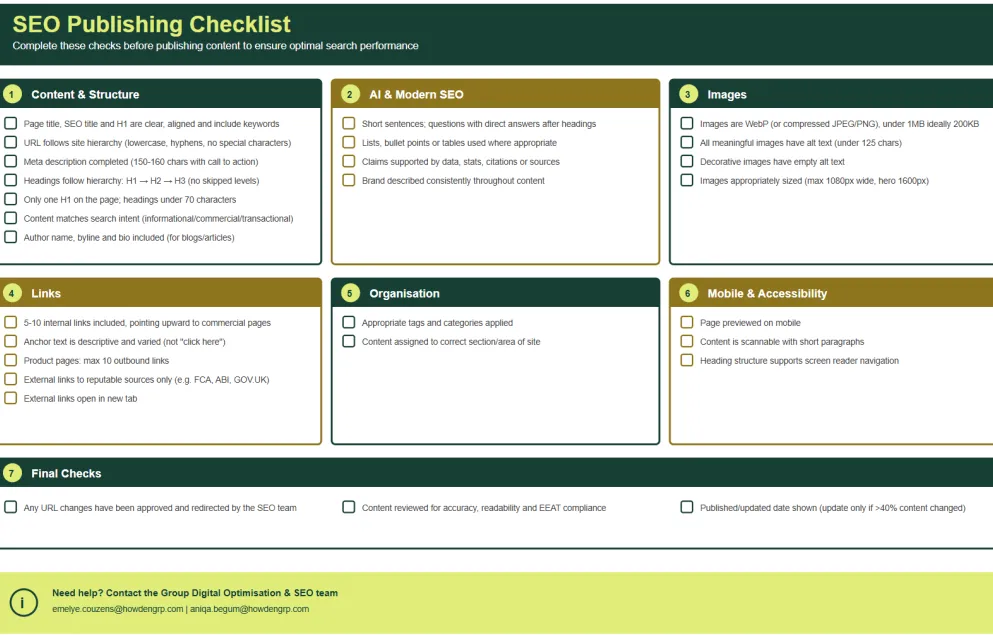
Before clicking publish, run through this checklist to ensure all fundamental SEO elements are in place:
12. Support and escalation
When to contact the Group SEO team
The Group SEO specialists are here to help.
Contact us for the below items:
Technical SEO:
- URL changes and redirects
- Crawl or indexing related queries
- Internal linking and structural questions
- Schema, accessibility questions
- Domains, migrations, integrations (M&A's)
On-page SEO
- Topic and keyword research for strategic content planning and build - we have tools to automate a lot of the heavy lifting
- Search intent and content type analysis
- Metadata review and general optimisation
- Heading structure guidance
- Structure and information gain (order of content for success)
- EEAT/YMYL analysis
Off-page SEO:
- Backlinking strategies
- Google my business queries
- Brand entity optimisation
- Digital PR and community with an SEO lens
Compliance and group standards:
- Ensuring content meets SEO best practices and modern principles
- Accessibility guidance related to SEO
- Domain strategy mandate
Audits and strategy
- Comprehensive data led audits and insights
- Strategy and tactics for long-term success
How to reach us
If you need help with any of the above or would like an evaluation of your SEO and advice on how to boost your organic visibility, reach out to us below.

Glossary of terms
| Term | Description |
|---|---|
301 redirect |
A permanent redirect that tells search engines a page/URL has changed or moved |
Accessibility |
Designing content so it can be used by people with disabilities |
AI optimisation a.ka GEO/AIO |
Structuring content for better understanding by AI and large language models |
Alt attribute | The HTML attribute used to specify alternative text for images |
Alt text | A text description of an image, used by screen readers and search engines |
Anchor text | The clickable text in a hyperlink |
Canonical URL | The preferred URL for a page to avoid duplicate content issues |
Cluster content | Supporting content covering subtopics, linked to a main parent or pillar page |
Content hierarchy | The organisation of content using headings and subheadings |
EEAT | Experience, Expertise, Authority, Trust – Google’s content quality framework |
External link | A hyperlink pointing to a page on a different website |
| Heading structure | The logical arrangement of headings (H1, H2, H3, etc.) for clarity and accessibility |
Internal link | A hyperlink connecting one page to another within the same website |
Link equity | The SEO value passed from one page to another through links |
Meta description | The summary text that appears in search engine results |
Mobile optimisation | Ensuring content displays and functions well on mobile devices |
Pillar content | Comprehensive, central content that covers a broad topic |
SEO | Search Engine Optimisation: improving website visibility in search engines |
SERP | Search Engine Results Page – the page displayed after a search query |
Slug | The last part of a URL that identifies a specific page |
Taxonomy | The system of categories and tags used to organise content |
URL alias | The readable web address for a page (e.g., /uk-en/insurance/cyber-insurance) |
WCAG | Web Content Accessibility Guidelines – international accessibility standards |
WebP | A modern image format that provides better compression than JPEG or PNG |
YMYL | Your Money or Your Life – content that can impact a person’s health, finances, or safety |
Last updated: January 2026. For questions or feedback on these guidelines, contact the Group Data & Optimisation team - We sit within the broader Collaboration & Client solutions division.